Icon of program: Blu-ray Player for Window…

Blu-ray Player for Windows

  • Trial version
  • 3.1
    771
  • 618.7K
  • V2.17.4.3899

Play Blu-ray disks on Windows

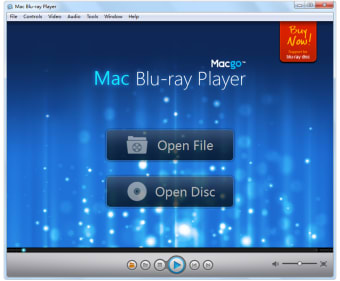
If you use both Mac and Windows and need a player that can play Blu-ray on both platforms then take a look at Macgo Windows Blu-ray (previously Blu-ray Player for Windows).

Macgo Windows Blu-ray recognizes Blu-ray devices and internal Blu-ray players instantly, meaning you can connect a Blu-ray player to your PC and watch Blu-ray discs. Not only that, but Macgo Windows Blu-ray supports almost every format out there so you can use it as your default player if you choose. Even better, for the first three months it's completely free to use, although a watermark is placed on the screen and some features will be deactivated.

To play protected Blu-ray movies however, you need an internet connection because Macgo Windows Blu-ray has to acquire a license to play the movie on your system. Macgo Windows Blu-ray is fairly basic. There are very few options other than to add subtitles and change the audio track. When you start it up for the first time, it will also prompt you to select which files you want to associate with it so it won't take over your media files unless you allow it to.

Macgo Windows Blu-ray also features a certain amount of social media support. You can post reviews or comment on the film you're are watching to Facebook or Twitter, which is a pretty neat feature.

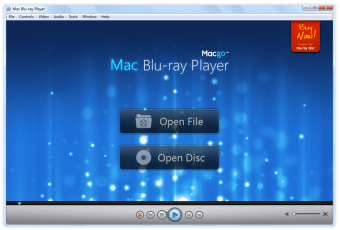
Macgo Windows Blu-ray feels a bit basic in design and you might experience some crashes and instability, but bear in mind this is the first release and the developers warn that some bugs and problems are to be expected.

If you're looking for a cross platform Blu-ray player, then Macgo Windows Blu-ray could be your answer.


  • Pros

    • Simple and easy to use
    • Can be used to play almost any file type
    • Free to use for 3 months
    • Integration with Facebook and Twitter
  • Cons

    • Player is very basic with few options
    • Requires an internet connection to aquire license
    • Can be unstable and buggy
 0/3

App specs

Program available in other languages


Icon of program: Blu-ray Player for Window…

Blu-ray Player for Windows

  • Trial version
  • 3.1
    771
  • 618.7K
  • V2.17.4.3899

User reviews about Blu-ray Player for Windows

3.1

13 reviews

Add review

Main reviews for you

  • Anonymous user

    I'm Using Shining Blu-ray Player now.. Shining Blu-ray Player is cheaper than Macgo player. It can play Blu-ray, DVD, HD Video, 4K UHD, 3D Video, SD Video and all music files. Got it from GOTD :)

  • Anonymous user

    Found this blu-ray player very fast.. This player could be tried for free before buy it. Support Blu-ray discs, dvd and other format movies. Pros: Free to try.

  • Anonymous user

    Play most blu-ray discs, easy to operate, low price.. It allows me to enjoy the most Blu-ray discs. And it is easy to operate. But it can not deal with the original Blu-ray menu, only the simple menu available. As the price is low, I think Macgo is a good choice considering its function, operation, and price. Pros: easy to operateplay most blu-ray discs Cons: can't support blu-ray menumay crash dealing with some new discs

  • Anonymous user

    The ranking of Macgo Windows Blu-ray Player in softonic is superior.. Softonic awards the software different ranking according to their popularity and quality. Maybe it's the core why it develops pretty well nowadays. Since its a standard site, I prefer selecting the higher ranking wares from different brands. Have a try on Macgo Blu-ray Player for Windows. Uh, it's share function provides me a more convenient way to share my favorite movies with my friends. Except that, it is a totally free media player for DVD playback without any limitation.Another important thing is that I found if I don't buy it when I playback Blu-ray discs, the screen will show watermarks. Other functions meet my needs so well. Pros: Free DVD playerPlayback smoothly. Cons: More features, you know customers are always hungry for this.

  • Anonymous user

    Free to try.. It is a good media player on PC. Free to try playing Blu-ray disc. It can play many formats without watermark. Pros: Free to try.It can play many media formats. Cons: It can't play blu-ray menu.It may crash playing some new blu-ray discs.

  • Anonymous user

    It gets better.. It could support more BD now. Especially, some new release movies like X-Man Days of Future Past, Leap Year... and fixed the audio playback crash problem. We could enjoy our home-cinema time. Pros: It could free try.I can watch DVD movies freely.

More

You may also like

Alternatives to Blu-ray Player for Windows

Explore Apps

Latest articles

Laws concerning the use of this software vary from country to country. We do not encourage or condone the use of this program if it is in violation of these laws.
Softonic

Is Blu-ray Player for Windows safe?

95/100

Score result: Warning

This file has been flagged as potentially harmful or containing unwanted bundled software. Please proceed with caution.

  • Virus free
  • Spyware free
  • Malware free
  • Verified by Security Partners

    VirusTotal logo

Scan Info

Last scan
Saturday, July 30, 2022
Scan provider
VirusTotal · Full report

File Integrity

File
Mac_Bluray_Player_for_Windows.exe
SHA256
a42207dacde8777f9a488c59b56f7f1bb037979a0708c3cc0c952a8d52622cda
SHA1
f7fb42449a337984a29af9412ba4454017ff0b9d

Softonic security notice

This software has been thoroughly scanned by our advanced security systems and verified by industry-leading partners. However, one or more antivirus engines have flagged this software with potential risks. While these detections may be false positives, we recommend caution when downloading and installing. Some programs may include unwanted software or behaviors that could affect your device. False positives can occur when safe software is mistakenly flagged as harmful due to overly cautious detection rules or algorithms in antivirus tools. This means the program may still be safe to use, but we advise reviewing the details before proceeding.